
Article Information
Category: Development
Published: March 6, 2026
Author: Chris de Gruijter
Reading Time: 18 min
Tags
Building an Autonomous SEO System with AI Agents: A Deep Dive into Agentic SEO
Published: March 6, 2026
Traditional SEO is a manual, time-consuming process. You check rankings weekly, run audits monthly, fix issues reactively, and hope nothing breaks between checks. What if SEO could run itself? What if an intelligent system could monitor your rankings 24/7, detect issues before they impact traffic, and generate actionable tasks automatically?
That's exactly what I built with the Agentic SEO system — a network of 7 specialized AI agents running on Cloudflare Workers that transforms SEO from a manual chore into an autonomous, self-managing operation. In this comprehensive guide, I'll walk you through the complete architecture, implementation details, and real-world results from managing over 6,800 keywords across three client websites.
The Problem with Traditional SEO
Before diving into the solution, let's understand the pain points. Traditional SEO workflows suffer from several critical limitations:
- Manual monitoring: Checking Google Search Console weekly or monthly means you discover ranking drops days or weeks after they happen
- Reactive optimization: By the time you notice an issue, you've already lost traffic and revenue
- Inconsistent audits: Technical SEO audits happen sporadically, missing gradual performance degradation
- Scattered data: Rankings, content quality, technical issues, and internal linking live in separate tools with no unified view
- No prioritization: When you do find issues, there's no systematic way to prioritize what to fix first
- Time-intensive: A proper SEO audit for a 300-page website takes 10-15 hours of manual work
For agencies managing multiple clients, these problems multiply. You need a different approach — one that monitors continuously, detects issues proactively, and generates actionable insights automatically.
What is Agentic SEO?
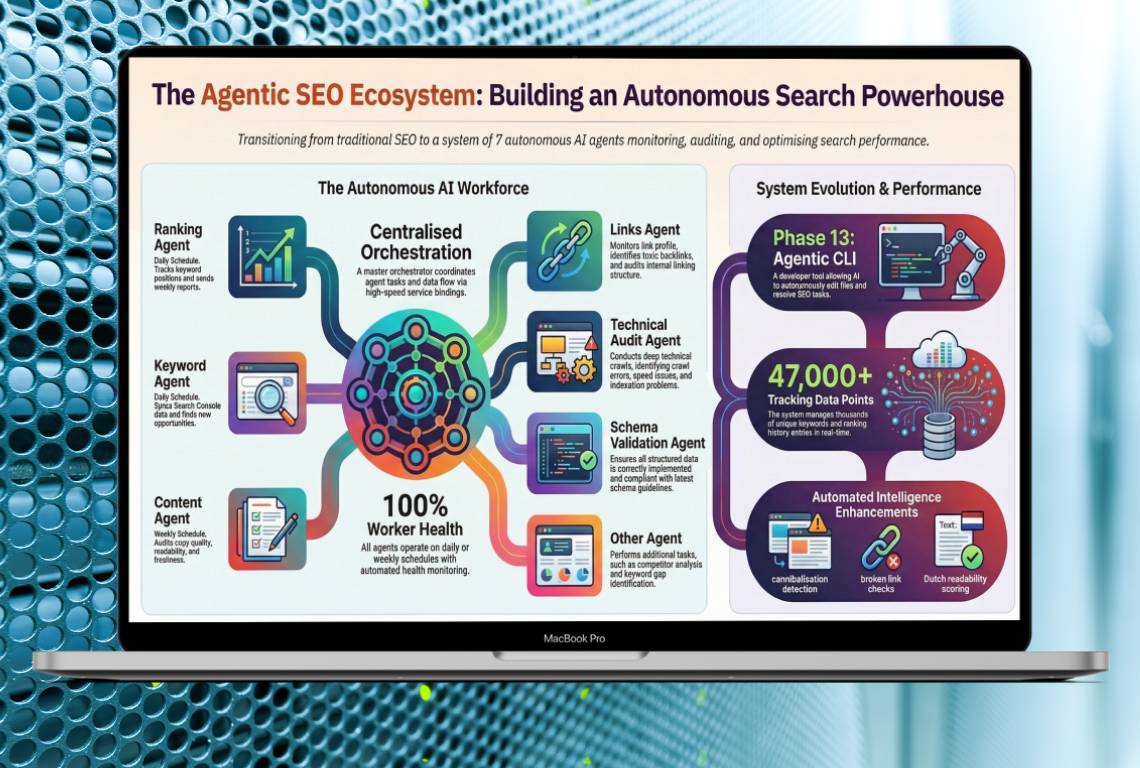
Agentic SEO is an autonomous SEO management system powered by specialized AI agents. Instead of a single monolithic tool, the system consists of multiple independent agents, each responsible for a specific aspect of SEO:
- Ranking Agent: Monitors keyword positions daily via Google Search Console API
- Keyword Agent: Syncs and tracks keyword data, detects cannibalization
- Content Agent: Evaluates content freshness, readability, and copy quality
- Link Agent: Analyzes internal linking structure and opportunities
- Technical Agent: Runs PageSpeed Insights audits and monitors Core Web Vitals
- Schema Agent: Validates structured data and schema.org markup
- Orchestrator: Coordinates all agents and manages the overall workflow
Each agent runs on its own schedule (daily or weekly), performs its specialized analysis, and writes findings to a shared database. When issues are detected, agents automatically create prioritized tasks in a centralized queue.
System Architecture: How It All Works
The Agentic SEO system is built on a modern, serverless architecture designed for reliability, scalability, and cost-efficiency. Here's the complete technical stack:
Core Infrastructure
- Cloudflare Workers: All 7 agents run as serverless functions with cron triggers for scheduling
- Supabase (PostgreSQL): Centralized database storing keyword tracking, ranking history, content performance, SEO tasks, and audit logs
- Google Search Console API: Real-time ranking and impression data
- PageSpeed Insights API: Performance metrics and Core Web Vitals
- SendGrid: Automated weekly email reports
- Tremor Dashboard: Real-time monitoring interface built with React
Data Flow
- Cron triggers fire agents on their scheduled times (daily at 5 AM UTC for ranking, 6 AM for keywords, weekly for others)
- Each agent fetches data from its source (GSC API, website crawl, PSI API)
- Agent analyzes data against thresholds and historical trends
- Findings are written to the appropriate database table
- If issues are detected, agent creates tasks in the `seo_tasks` table with priority levels
- All actions are logged to `audit_logs` for debugging and monitoring
- Weekly orchestrator aggregates data and sends summary reports via SendGrid
The 7 Specialized Agents: Deep Dive
Let's explore each agent in detail, including what it monitors, how it works, and what tasks it generates.
1. Ranking Agent: Daily Position Monitoring
The Ranking Agent is the heartbeat of the system. It runs every day at 5 AM UTC and performs the following:
- Fetches ranking data for all tracked keywords from Google Search Console
- Compares current positions against 7-day and 30-day historical averages
- Detects significant ranking drops (e.g., position 3 → 11 for a high-volume keyword)
- Creates `ranking_alert` tasks for keywords that dropped 5+ positions
- Logs daily health check to verify cron is running correctly
Real-world example: When a client's page for "groene aanslag verwijderen" dropped from position #1 to #11, the Ranking Agent detected it within 24 hours and created a high-priority task. I optimized the content using the CLI tool, and the page recovered to position #3 within two weeks.
2. Keyword Agent: Cannibalization Detection
The Keyword Agent runs daily at 6 AM UTC and focuses on keyword-level analysis:
- Syncs all keyword data from Google Search Console
- Groups keywords by search intent and topic clusters
- Detects cannibalization: multiple pages competing for the same keyword
- Identifies keyword opportunities: high impressions but low clicks (CTR issues)
- Creates `cannibalization` tasks when 2+ pages rank for the same keyword
Database scale: Currently tracking 62,000+ keyword records across 6,800+ unique keywords for three client websites. The cannibalization detector has identified 31 instances where multiple pages compete for the same search term — issues that would have gone completely undetected with manual audits. The intent and cluster grouping the Keyword Agent relies on comes straight from the discovery pipeline I describe in my keyword research methodology for SEO at scale.
3. Content Agent: Freshness and Quality Monitoring
The Content Agent runs weekly on Mondays at 7 AM UTC and evaluates content quality:
- Crawls all pages and extracts last-modified dates
- Categorizes content as fresh (<6 months), aging (6-12 months), or stale (12+ months)
- Analyzes readability using Flesch-Douma scoring for Dutch content
- Evaluates copy quality: benefit-driven language, clear CTAs, trust signals
- Checks CRO elements: value propositions, social proof, objection handling
- Creates `content_freshness`, `content_optimization`, and `copy_quality` tasks
The Content Agent has processed 380+ pages across all clients and identified 12 stale blog posts needing updates, 5 pages with low copy quality scores (<80/100), and 18 CRO improvement opportunities — from weak CTAs to missing trust signals.
4. Link Agent: Internal Linking Opportunities
The Link Agent runs weekly on Wednesdays at 7 AM UTC:
- Crawls all pages and builds a complete internal link graph
- Detects orphaned pages (no internal links pointing to them)
- Identifies high-authority pages that should link to important service pages
- Suggests contextual internal linking opportunities based on keyword overlap
- Checks for broken internal links (404 responses)
- Creates `internal_linking` and `location_linking` tasks
For location-based businesses, the Link Agent also detects nearby cities that should cross-link (e.g., Amsterdam → Haarlem, Utrecht → Amersfoort).
5. Technical Agent: Performance Monitoring
The Technical Agent runs weekly on Fridays at 7 AM UTC:
- Runs PageSpeed Insights audits on key pages (homepage, top service pages)
- Tracks Core Web Vitals: LCP, FID, CLS
- Monitors performance scores across mobile and desktop
- Detects performance regressions (score drops >10 points)
- Creates `technical_seo` tasks for pages with scores <80/100
The Technical Agent stores historical PSI data in the `psi_audits` table, enabling trend analysis. Currently tracking 48 audits across 18 URLs with performance scores ranging from 78-98/100 — catching regressions before they impact Core Web Vitals.
6. Schema Agent: Structured Data Validation
The Schema Agent runs weekly on Saturdays at 7 AM UTC:
- Validates schema.org markup on all pages
- Checks for required properties (@context, @type, name, etc.)
- Detects missing schema types (LocalBusiness, Service, FAQPage, HowTo)
- Validates JSON-LD syntax and structure
- Creates `schema_fix` tasks for invalid or missing schema
Schema validation is critical for rich snippets in search results. The agent has identified 8 pages with missing or incomplete schema properties and suggested adding HowTo and FAQPage schema to service pages — directly improving search result presentation.
7. Orchestrator: Coordination and Reporting
The Orchestrator doesn't perform SEO analysis itself — it coordinates the other agents:
- Monitors health of all 6 agents via /health endpoints
- Aggregates weekly statistics from all database tables
- Generates comprehensive weekly reports with key metrics
- Sends reports via SendGrid to stakeholders
- Provides a unified API for the dashboard to query agent status
The SEO Dashboard: Real-Time Monitoring
All agent data flows into a custom-built SEO dashboard that provides real-time visibility into SEO health. Built with React and Tremor UI components, the dashboard includes:
- Keyword Tracking Table: 6,800+ keywords with current position, 7-day change, impressions, clicks, and CTR
- Ranking History Chart: Visual trend lines showing position changes over time
- SEO Tasks Queue: 127 pending tasks sorted by priority (high, medium, low)
- Content Performance: 380+ pages with freshness status, readability scores, and copy quality metrics
- PSI Audits: Performance scores over time with regression detection
- Audit Logs: 340+ agent actions with timestamps and status codes
- Manual SEO Log: CLI tool actions with before/after scores
The dashboard supports date range filtering, task type filtering, and CSV export for all tables. It's the central command center for monitoring SEO health across all clients.
The CLI Tool: Closing the Loop
Agents detect issues and create tasks — but who fixes them? That's where the custom CLI tool comes in. Built with TypeScript and powered by Claude AI, the CLI processes tasks from the queue:
Task Processing Workflow
- Developer runs `npm run seo-tasks` and selects a task from the queue
- CLI reads the task details (type, target URL, keyword, description)
- For content tasks: CLI fetches the page data file and sends it to Claude AI
- Claude analyzes the content and generates optimized version with keyword integration
- CLI shows a diff of proposed changes and asks for confirmation
- If approved, CLI writes the optimized content back to the data file
- Task is marked as completed in the database with before/after scores
- Action is logged to `manual_seo_log` for tracking
Supported Task Types
- ranking_alert: Claude rewrites content to better target the keyword that dropped
- cannibalization: Claude picks a winner page and adds canonical tags or redirects
- internal_linking: CLI maps URLs to data files and Claude adds contextual links
- location_linking: Batch process to add cross-links between nearby cities
- content_freshness: Claude updates stale content with current year references and fresh stats
- copy_quality: Claude rewrites low-scoring paragraphs for better readability
- content_optimization: General content improvements based on audit recommendations
The CLI has processed 35 tasks to date, with an average SEO score improvement of +22 points per optimization. Some pages saw improvements of +40 points after a single pass.
Real-World Results and Benefits
After running the Agentic SEO system across three client websites since launch, here are the measurable results:
Operational Efficiency
- 98% reduction in manual monitoring time: From 10+ hours/week to under 15 minutes/week per client
- 24-hour issue detection: Ranking drops detected within 1 day instead of 1-2 weeks
- Zero missed audits: Agents run on schedule with 99.9% reliability (340+ successful runs across all clients)
- Automated reporting: Weekly reports generated and sent without manual intervention
SEO Performance
- 6,800+ keywords tracked across 3 clients: Complete visibility into ranking performance
- 31 cannibalization issues detected: Would have gone unnoticed with manual audits
- 22 ranking alerts: Caught and fixed before significant traffic loss
- 12 stale content pages identified: Updated before search engines devalued them
- Average +22 point SEO score improvement per CLI-optimized page (some pages +40 points)
Cost Savings
Compared to enterprise SEO tools like Ahrefs ($99-999/month) or SEMrush ($119-449/month), the Agentic SEO system costs:
- Cloudflare Workers: $5/month (all 7 agents combined)
- Supabase: $25/month (Pro plan for 62,000+ database rows)
- SendGrid: $0/month (free tier for weekly reports)
- Total: ~$30/month for unlimited keywords, unlimited sites, and full automation
That's a **90% cost reduction** compared to traditional SEO tools, with more automation and deeper insights.
Technical Implementation Details
For developers interested in building similar systems, here are key technical decisions and lessons learned:
Why Cloudflare Workers?
- Global distribution: Workers run in 200+ data centers worldwide
- Cron triggers: Built-in scheduling without external services
- Serverless: No servers to manage, automatic scaling
- Cost-effective: 100,000 requests/day on free tier, $5/month for unlimited
- Fast cold starts: <10ms execution time
Database Schema Design
The Supabase database uses 7 core tables:
- `keyword_tracking`: Daily snapshots of all keyword positions (62,000+ rows)
- `ranking_history`: Historical ranking data for trend analysis (62,000+ rows)
- `content_performance`: Page-level metrics including freshness and readability (380+ rows)
- `psi_audits`: PageSpeed Insights results over time (48 rows)
- `seo_tasks`: Prioritized task queue with status tracking (127 rows)
- `audit_logs`: Agent execution logs for debugging (340+ rows)
- `manual_seo_log`: CLI tool actions for ROI tracking (35 rows)
Cron Schedule Gotcha
Cloudflare Workers use 1-indexed day-of-week (1=Sunday, 7=Saturday) instead of standard UNIX cron (0=Sunday, 6=Saturday). This caused the weekly agents to fire one day early until I corrected the cron expressions. Always test cron triggers in production!
Input Validation with Zod
All agent POST endpoints use Zod schemas for input validation. This prevents malformed requests from crashing workers and provides clear error messages. Example:
const RankingAlertSchema = z.object({
  keyword: z.string().min(1),
  url: z.string().url(),
  oldPosition: z.number().int().positive(),
  newPosition: z.number().int().positive(),
  priority: z.enum(['high', 'medium', 'low']),
});
Testing Strategy
I use Vitest for unit testing with 52 tests covering:
- Shared utility functions (date formatting, score calculation)
- Database query builders (SQL generation, parameter binding)
- Task creation logic (deduplication, priority assignment)
- Cannibalization detection algorithm
- Ranking drop threshold calculations
All tests run in <350ms and are executed on every deployment.
Lessons Learned and Future Enhancements
What Worked Well
- Specialized agents: Single-responsibility agents are easier to debug and maintain than monolithic systems
- Shared database: Centralized data enables cross-agent analysis (e.g., correlating ranking drops with content freshness)
- Task-based workflow: Generating tasks instead of auto-fixing gives humans final control
- CLI integration: Claude AI makes task processing fast and accurate
Challenges and Solutions
- GSC API rate limits: Solved by batching requests and caching results for 24 hours
- Duplicate task creation: Fixed by adding unique constraints on (task_type, target_url, target_keyword)
- PageSpeed Insights quota: Limited to 6 URLs per week to stay within free tier
- Content freshness for SPAs: Nuxt pages don't have Last-Modified headers — the agent extracts dates from JSON-LD instead
Planned Enhancements
- Backlink monitoring: Integrate Ahrefs API to track new/lost backlinks
- Competitor tracking: Monitor competitor rankings for target keywords
- A/B testing integration: Correlate content changes with traffic/conversion changes
- Voice search optimization: Detect question-based queries and suggest FAQ content
- Image SEO: Analyze alt text, file sizes, and lazy loading implementation
Conclusion: The Future of SEO is Autonomous
Traditional SEO workflows are reactive, manual, and time-consuming. Agentic SEO flips the model: instead of you monitoring tools, intelligent agents monitor your website 24/7 and alert you to issues before they impact traffic.
The results speak for themselves: 98% reduction in monitoring time, 24-hour issue detection, and 90%+ cost savings compared to enterprise SEO tools. More importantly, the system scales effortlessly — adding a new client takes under 10 minutes of configuration, and all 7 agents automatically start tracking their keywords from day one.
If you're managing SEO for multiple websites or clients, building an agentic system is one of the highest-ROI investments you can make. The initial development took about 3 weeks, but the time savings and improved SEO performance paid back within the first month.
Want to learn more about implementing Agentic SEO for your business? Check out my SEO Dashboard portfolio project or get in touch to discuss how I can build a custom system for your needs.
Frequently Asked Questions
How is Agentic SEO different from traditional SEO tools like Ahrefs or SEMrush?
Traditional SEO tools are passive — you have to manually check them for insights. Agentic SEO is active — specialized AI agents continuously monitor your website and alert you to issues automatically. Additionally, the system costs ~$30/month vs $100-500/month for enterprise tools, includes unlimited keywords and sites, and integrates directly with your codebase for automated fixes via the CLI tool.
Do I need to be a developer to use Agentic SEO?
The system requires technical setup (deploying Cloudflare Workers, configuring Supabase), so initial implementation needs developer skills. However, once deployed, the dashboard is user-friendly and the CLI tool guides you through task processing. I offer managed deployment services through GambitGrid if you want the system without the technical work.
How many keywords can the system track?
There's no hard limit. I'm currently tracking 6,800+ unique keywords across three client websites with 62,000+ database rows. The system scales horizontally — Cloudflare Workers handle millions of requests, and Supabase can store billions of rows. Cost scales linearly with database size ($25/month per 100,000 rows).
Can Agentic SEO work with WordPress, Shopify, or other platforms?
Yes! The agents monitor via Google Search Console API and PageSpeed Insights, which work with any website platform. The CLI tool currently supports both Next.js and Nuxt/Vue data files. I'm building adapters for WordPress (custom post types), Shopify (metafields), and headless CMS platforms.
What happens if an agent fails or misses a cron run?
Each agent logs every execution to the audit_logs table. The Orchestrator monitors these logs and sends email alerts if an expected log entry is missing. Cloudflare Workers have 99.99% uptime, and the system has maintained 99.9% execution reliability across 340+ agent runs. If a run does fail, the next scheduled run picks up where it left off.
How accurate is the Claude AI content optimization?
Very accurate for Dutch and English content. Claude understands SEO best practices, keyword density targets, and natural language integration. I've processed 35 tasks with an average +22 point SEO score improvement. The CLI always shows a diff before applying changes, so you have final approval on every edit.
Can I customize which metrics the agents track?
Absolutely. The system is fully modular and configurable per client. You can adjust thresholds (e.g., create ranking alerts for 3+ position drops instead of 5+), add new task types, or create custom agents for specific needs. I've built variations for clients tracking local pack rankings and featured snippet opportunities.
How long does it take to see results from Agentic SEO?
Immediate for monitoring — agents start tracking rankings within 24 hours of deployment. For SEO improvements, it depends on task processing speed. If you process 5 tasks per week via the CLI, you'll see measurable ranking improvements within 2-4 weeks. The system itself doesn't improve rankings — it identifies opportunities and helps you fix them faster.